
Hello, I'm Seongjae Park from OptAI.
The previous article compared the Core AI conversion stack with ANEMLL. This follow-up records measurements from running a model with Core AI on an actual iPhone. We took Qwen3-0.6B through the full process from export to device measurement, comparing both Core AI engines, GPU/ANE, with MLX and CoreML-LLM under the same conditions.
1. Requirements: iOS 27 beta and Xcode 27 beta
Testing Core AI on iPhone requires the following.
- iOS 27 beta (device)
- Xcode 27 beta (Mac)
At the time of writing, the stable release is 26.x, so the device must be backed up before updating to 27 beta. The Core AI framework is not included in the iOS simulator SDK, making physical-device measurement necessary.
2. The Key Premise: Export Shapes Determine the Compute Device
This is the first point to understand about Core AI. Whether the model runs on ANE or GPU on iPhone is determined by model shapes at export time, not by a runtime flag.
| Export | Command | Shape / quantization | Automatically selected engine | Compute device |
|---|---|---|---|---|
| Static | coreai.llm.export qwen3-0.6b --platform iOS | Fixed ctx · 4bit palettized | static-shape | ANE |
| Dynamic | coreai.llm.export qwen3-0.6b --platform macOS | Dynamic ctx · INT4 linear | coreai-pipelined | GPU |
The export-path split discussed previously, static shapes plus enumerated specialization for iOS and dynamic shapes for macOS, becomes the ANE-versus-GPU engine split at runtime. EngineFactory inspects the bundle structure and selects the engine automatically. Comparing the two compute devices therefore requires separate bundles, which is how these measurements were conducted.
3. Pipeline: Export → AOT Compile → Assemble → Sideload → Measure
The full workflow has five stages.
Export        (Mac, Python)    : HF model → Core AI MLIR IR (.aimodel)
AOT compile   (Mac, aimodelc)  : IR → device GPU-arch .aimodelc   ← iOS-specific stage
Assemble      (Mac, shell)     : .aimodelc + tokenizer + metadata.json → loadable bundle
Sideload      (Mac → iPhone)
Measure (iPhone, app)We use the export recipes from the coreai-models repository published by Apple without modification.
cd ~/code/coreai/coreai-models

# For GPU (dynamic shape, INT4) — uses the coreai-pipelined GPU engine
uv run coreai.llm.export qwen3-0.6b --platform macOS --output-name qwen3_0_6b_dynamic

# For ANE (static shape, palettized 4bit) — uses the static-shape ANE engine
uv run coreai.llm.export qwen3-0.6b --platform iOS \
    --compression 4bit_weight_palettized_group32 --output-name qwen3_0_6b_ios_pure4bit
The resulting .aimodel is IR, not an executable binary. macOS can JIT-compile it at load time, but iOS cannot, which is why the next stage is necessary.
The exported model consists of the 4 entrypoints discussed in the previous article.
load_embeddings   : Load the embedding table once
gather_embeddings : Convert token id to fp16 transformer_input
prompt_opt        : Process long prompt chunks and populate only the KV cache
extend : transformer forward + KV cache update + generate logitsLoading the IR directly on iOS causes an error. It must be compiled ahead of time for the GPU architecture of the target device.
xcrun coreai-build compile qwen3_0_6b_ios_pure4bit.aimodel \
    --platform iOS --preferred-compute neural-engine --architecture h18p --output out/
# → out/qwen3_0_6b_ios_pure4bit.h18p.aimodelc
--preferred-compute neural-engine→ ANE bundle;gpu→ GPU bundle--architecture h18p→ the GPU family of iPhone 17 Pro (A19 Pro). Other devices require recompilation for their architecture code.
Place the compiled .aimodelc, tokenizer, and metadata.json in one folder, then patch assets.main in metadata.json to the device-architecture-specific compiled filename.
# What assemble() in bench_coreai_iphone.sh does (summary)
cp -R out/qwen3_0_6b_ios_pure4bit.h18p.aimodelc  bundle/
cp -R tokenizer  bundle/
# Patch metadata.json assets.main = "qwen3_0_6b_ios_pure4bit.h18p.aimodelc"
This produces two bundles, one for ANE and one for GPU.
We launch the benchmark app with devicectl to collect measurements.
xcrun devicectl device process launch --terminate-existing --device <UDID> \
  com.iosllmbenchmark.benchmarkapp -- \
  --yardstick-autorun --runtime core-ai --model-id core-ai/qwen3-0.6b-gpu --task short-chat --runs 1
4. Results: Qwen3-0.6B on iPhone 17 Pro
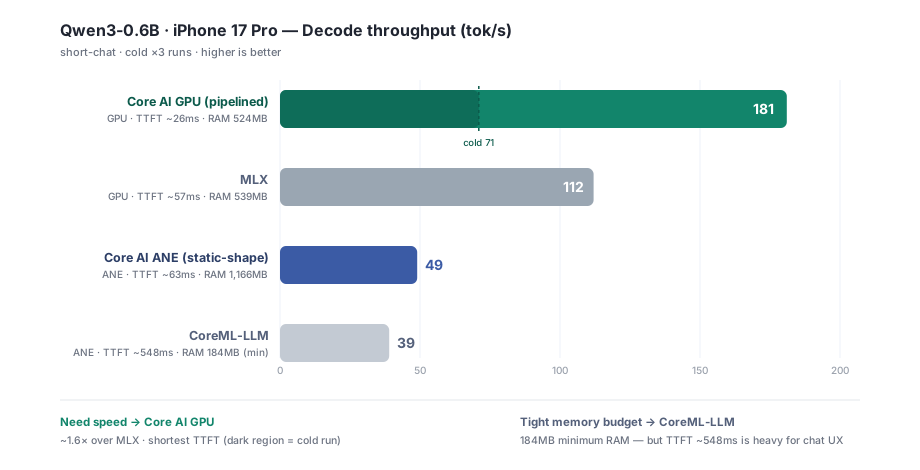
*Qwen3-0.6B decode throughput on iPhone 17 Pro (short-chat, cold ×3)*
| Engine | Compute | Decode tok/s | TTFT (warm) | Peak RAM |
|---|---|---|---|---|
| Core AI GPU (pipelined) | GPU | 181 (cold 71) | ~26 ms | 524 MB |
| MLX | GPU | 112 | ~57 ms | 539 MB |
| Core AI ANE (static-shape) | ANE | 49 | ~63 ms | 1,166 MB |
| CoreML-LLM | ANE | 39 | ~548 ms | 184 MB (lowest) |
5. Analysis: Three Observations
First, the Core AI GPU pipelined engine leads decisively. Its decode throughput of 181 tok/s is approximately 1.6 times MLX at 112 tok/s on the same GPU, while its TTFT of ~26ms is the shortest. The coreai-pipelined engine, combining dynamic shapes and INT4 linear quantization, was the fastest LLM execution path on iPhone in these measurements.
Second, the gap between cold and warm runs is large. The GPU engine goes from cold 71 tok/s → warm 181 tok/s, apparently reflecting the device-specific specialization Core AI performs on first load. Handling first-run latency is therefore an important UX consideration for production services.
Third, the ANE path is a memory-oriented choice rather than a speed-oriented one. Core AI ANE was substantially slower than GPU at 49 tok/s and had the highest Peak RAM at 1,166MB. CoreML-LLM, by contrast, was slowest at 39 tok/s but used the least memory, 184MB. Its TTFT of ~548ms is nevertheless demanding for conversational UX. For iPhone 17 Pro in this test, the practical choices were Core AI GPU when speed matters and CoreML-LLM under extreme memory constraints. Under these measurement conditions, 0.6B and short-chat, the ANE path did not lead on both axes.
6. Conclusion
In Core AI, compute selection is already determined at export time. Shapes and quantization select the engine, and iOS adds an architecture-specific AOT compilation stage. The resulting coreai-pipelined GPU engine showed a clear performance advantage over the existing on-device runtimes.
These measurements cover one model, Qwen3-0.6B, on one device, iPhone 17 Pro, using the short-chat task. The relative strengths of ANE and GPU may change with model size, including 1.7B and larger, and context length. We plan to expand the measurement scope in a future article.
The exported .aimodel is MLIR IR rather than an executable binary. macOS supports JIT compilation at load time, but iOS does not. A .aimodelc compiled ahead of time on a Mac for the target GPU architecture, such as h18p, is therefore required.
The Core AI runtime component that inspects bundle structure, including shapes and quantization, to select the static-shape ANE engine or coreai-pipelined GPU engine automatically. Users do not select the compute device through a runtime flag.
The latency from a request to the first generated token. It is affected by both prefill performance and whether the model is loaded cold or warm.
The process of optimizing a Core AI model for the current device and OS version on first load. It is a major contributor to the performance gap between cold and warm runs.
References
- OptAI Blog, "Core AI: Redesigning the Conversion Stack for On-Device Generative Models" — the preceding article
- apple/coreai-models — official Core AI models and export recipes (github.com/apple/coreai-models)
- Apple, "Integrate on-device AI models into your app using Core AI" — WWDC26 Session 326